blob: 5ebd6193d65ae80a8d981a86d1c04c2df960e1c8 (
plain)
1
2
3
4
5
6
7
8
9
10
11
12
13
14
15
16
17
18
19
20
21
22
23
24
25
26
27
28
29
30
31
32
33
34
35
36
37
38
39
40
41
42
43
44
45
46
47
48
49
50
51
52
53
54
55
56
57
58
59
60
61
62
63
64
65
66
67
68
69
70
71
72
73
74
75
76
77
78
79
80
81
82
83
|
# low_latency_layer
A C++23 implicit Vulkan layer that reduces click-to-photon latency by implementing both AMD and NVIDIA's latency reduction technologies.
The layer allows AMD or Intel hardware to provide implementations for and switch between `VK_NV_low_latency2` and `VK_AMD_anti_lag` device extensions. This capability, coupled with work that forwards relevant calls in [dvxk-nvapi](https://github.com/jp7677/dxvk-nvapi/), allows the use of these technologies despite the lack of a driver-level implementation.
The layer also eliminates a hardware support disparity as considerably more applications support NVIDIA's Reflex than AMD's Anti-Lag.
[Benchmarks are available here.](#benchmarks)
# Planned
- Respect the provided framerate limit.
- Cross-platform builds.
- Improvements to logging and statistics.
- HUD with latency information.
# Dependencies
- [CMake](https://cmake.org): A cross-platform, open-source build system generator.
- [Vulkan Headers](https://github.com/KhronosGroup/Vulkan-Headers): Vulkan header files and API registry.
- [Vulkan Utility Libraries](https://github.com/KhronosGroup/Vulkan-Utility-Libraries): Library to share code across various Vulkan repositories.
# Building from Source and Installation
Clone this repo.
```
$ git clone https://git.nj3.xyz/low_latency_layer
$ cd low_latency_layer
```
Create an out-of-tree build directory (creatively we'll use 'build') and install.
> ⚠️ **WARNING:** You are likely going to have to install your distro's `vulkan-headers`, `vulkan-utility-libraries`, and possibly even `cmake` packages before proceeding. If you see an error here their absense is almost certainly the reason.
```
$ cmake -B build ./
$ cd ./build
$ sudo make install
```
To verify that the installation succeeded you can run this command. If it prints '1' the loader can see the layer and installation was successful.
```
$ vulkaninfo 2>/dev/null | grep -q VK_LAYER_NJ3AHXAC_LowLatency && echo 1 || echo 0
```
# Usage and Configuration
By default, the layer exposes the `VK_AMD_anti_lag` device extension. For Linux native applications like *Counter-Strike 2* this works out-of-the-box, allowing you to toggle AMD's Anti-Lag in its menus. You can further customize the layer's behavior using the environment variables listed below.
| Variable | Description |
| :--- | :--- |
| `LOW_LATENCY_LAYER_EXPOSE_REFLEX` | Set to `1` to expose `VK_NV_low_latency2` instead of `VK_AMD_anti_lag`. |
| `LOW_LATENCY_LAYER_SPOOF_NVIDIA` | Set to `1` to report the device as an NVIDIA GPU to the application, regardless of actual hardware. This is necessary for many applications to expose Reflex as an option. It _might_ be beneficial to keep this off when the application allows it. |
| `DISABLE_LOW_LATENCY_LAYER` | Set to `1` to disable the layer. |
For Proton-based applications, you must enable NVAPI support alongside the layer's configuration. Use the `PROTON_FORCE_NVAPI=1` environment variable to force this support regardless of your hardware.
**Steam launch options example:**
```
PROTON_FORCE_NVAPI=1 LOW_LATENCY_LAYER_EXPOSE_REFLEX=1 LOW_LATENCY_LAYER_SPOOF_NVIDIA=1 %command%
```
The 'Boost' mode of Reflex is supported but is functionally identical to 'On' - the layer treats both modes identically.
# Example: Enable NVIDIA spoofing
LOW_LATENCY_LAYER_SPOOF_NVIDIA=1 ./your-application
```
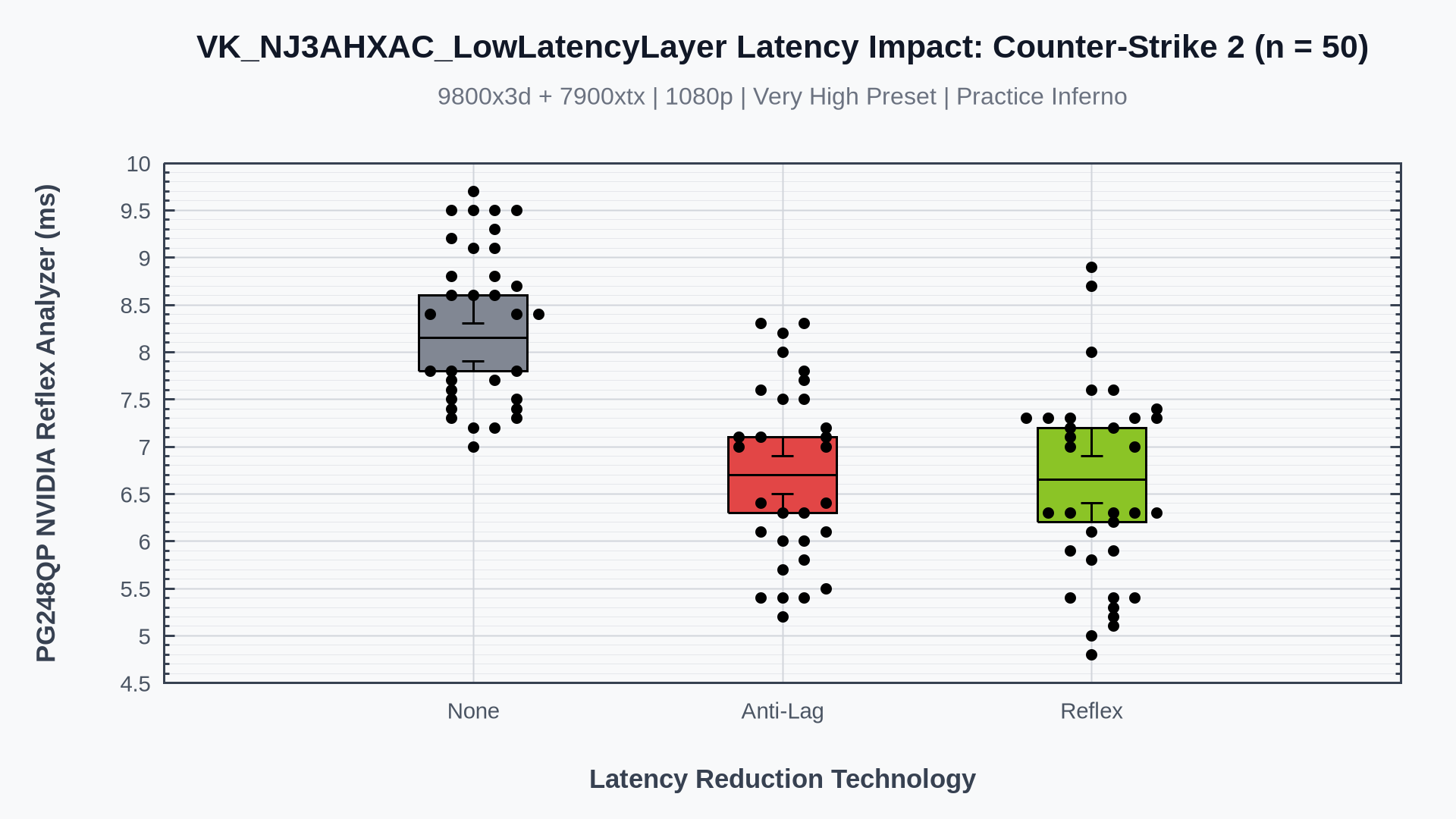
# Benchmarks
WIP - not updated for reflex merge
## Counter-Strike 2
## The Finals

|
