1
2
3
4
5
6
7
8
9
10
11
12
13
14
15
16
17
18
19
20
21
22
23
24
25
26
27
28
29
30
31
32
33
34
35
36
37
38
39
40
41
42
43
44
45
46
47
48
49
50
51
52
53
54
55
56
57
58
59
60
61
62
63
64
65
66
67
68
69
70
71
72
73
74
75
76
77
78
79
80
81
82
83
84
85
86
87
88
89
90
91
92
93
94
95
96
97
98
99
100
101
102
103
104
105
106
107
108
109
110
|
# low_latency_layer
A C++23 implicit Vulkan layer that reduces click-to-photon latency by implementing both AMD and NVIDIA's latency reduction technologies.
By providing hardware-agnostic implementations of the `VK_NV_low_latency2` and `VK_AMD_anti_lag` device extensions, this layer brings Reflex and Anti-Lag capabilities to AMD and Intel GPUs. When paired with [dvxk-nvapi](https://github.com/jp7677/dxvk-nvapi/) to forward the relevant calls, it completely bypasses the need for official driver-level support.
The layer also eliminates a hardware support disparity as considerably more applications support NVIDIA's Reflex than AMD's Anti-Lag.
[Benchmarks are available here.](#testing-and-benchmarks)
# Planned
- Respect the provided framerate limit.
- Cross-platform builds.
- Improvements to logging and statistics.
- HUD with latency information.
# Dependencies
- [CMake](https://cmake.org): A cross-platform, open-source build system generator.
- [Vulkan Headers](https://github.com/KhronosGroup/Vulkan-Headers): Vulkan header files and API registry.
- [Vulkan Utility Libraries](https://github.com/KhronosGroup/Vulkan-Utility-Libraries): Library to share code across various Vulkan repositories.
# Building from Source and Installation
Clone this repo.
```
$ git clone https://git.nj3.xyz/low_latency_layer
$ cd low_latency_layer
```
Create an out-of-tree build directory (creatively we'll use 'build') and install.
> ⚠️ **WARNING:** You are likely going to have to install your distro's `vulkan-headers`, `vulkan-utility-libraries`, and possibly even `cmake` packages before proceeding. If you see an error here their absence is almost certainly the reason.
```
$ cmake -B build ./
$ cd ./build
$ sudo make install
```
To verify that the installation succeeded you can run this command. If it prints '1' the loader can see the layer and installation was successful.
```
$ vulkaninfo 2>/dev/null | grep -q VK_LAYER_NJ3AHXAC_LowLatency && echo 1 || echo 0
```
# Usage and Configuration
By default, the layer exposes the `VK_AMD_anti_lag` device extension. For Linux native applications like *Counter-Strike 2* this works out-of-the-box, allowing you to toggle AMD's Anti-Lag in its menus. You can further customize the layer's behavior using the environment variables listed below.
| Variable | Description |
| :--- | :--- |
| `LOW_LATENCY_LAYER_EXPOSE_REFLEX` | Set to `1` to expose `VK_NV_low_latency2` instead of `VK_AMD_anti_lag`. |
| `LOW_LATENCY_LAYER_SPOOF_NVIDIA` | Set to `1` to report the device as an NVIDIA GPU to the application, regardless of actual hardware. This is necessary for many applications to expose Reflex as an option. It _might_ be beneficial to keep this off when the application allows it. |
| `DISABLE_LOW_LATENCY_LAYER` | Set to `1` to disable the layer. |
For Proton-based applications, you must enable NVAPI support alongside the layer's configuration. Use the `PROTON_FORCE_NVAPI=1` environment variable to force this support regardless of your hardware.
**Steam launch options example:**
```
PROTON_FORCE_NVAPI=1 LOW_LATENCY_LAYER_EXPOSE_REFLEX=1 LOW_LATENCY_LAYER_SPOOF_NVIDIA=1 %command%
```
The 'Boost' mode of Reflex is supported but is functionally identical to 'On' - the layer treats both modes identically.
# Testing and Benchmarks
Benchmarks were conducted under worst-case conditions using high-end AMD hardware. In systems with lower GPU overhead, these latency reductions may be even more pronounced.
## Setup
* **GPU:** ASUS TUF Radeon RX 7900 XTX (flashed 550W Aqua Extreme BIOS) 1350MHz VRAM watercooled
* **CPU:** AMD Ryzen 7 9800X3D 102.5MHz eCLK -15 CO 2133MHz FCLK delid watercooled
* **Memory:** 64GB 2x32GB Hynix A-Die 6000MT/s CL28-36-36-30 GDM:off Nitro:1-2-0
We used Gentoo running KDE Plasma 6.5.5-rc1. Direct scanout was enabled throughout the testing process, verified as KWin’s 'Compositing' watermark disappeared when in fullscreen.
## Methodology
Latency was measured using the NVIDIA Reflex Analyzer integrated into the ASUS PG248QP. To ensure precision and remove game-induced variance, we utilized an automated input script that triggered an immediate view-angle change upon mouse click. This approach bypasses the inconsistencies of variable-speed animations and game-engine tickrate jitter, providing a consistent measurement of total click-to-photon latency.
## Overwatch 2
**Results**
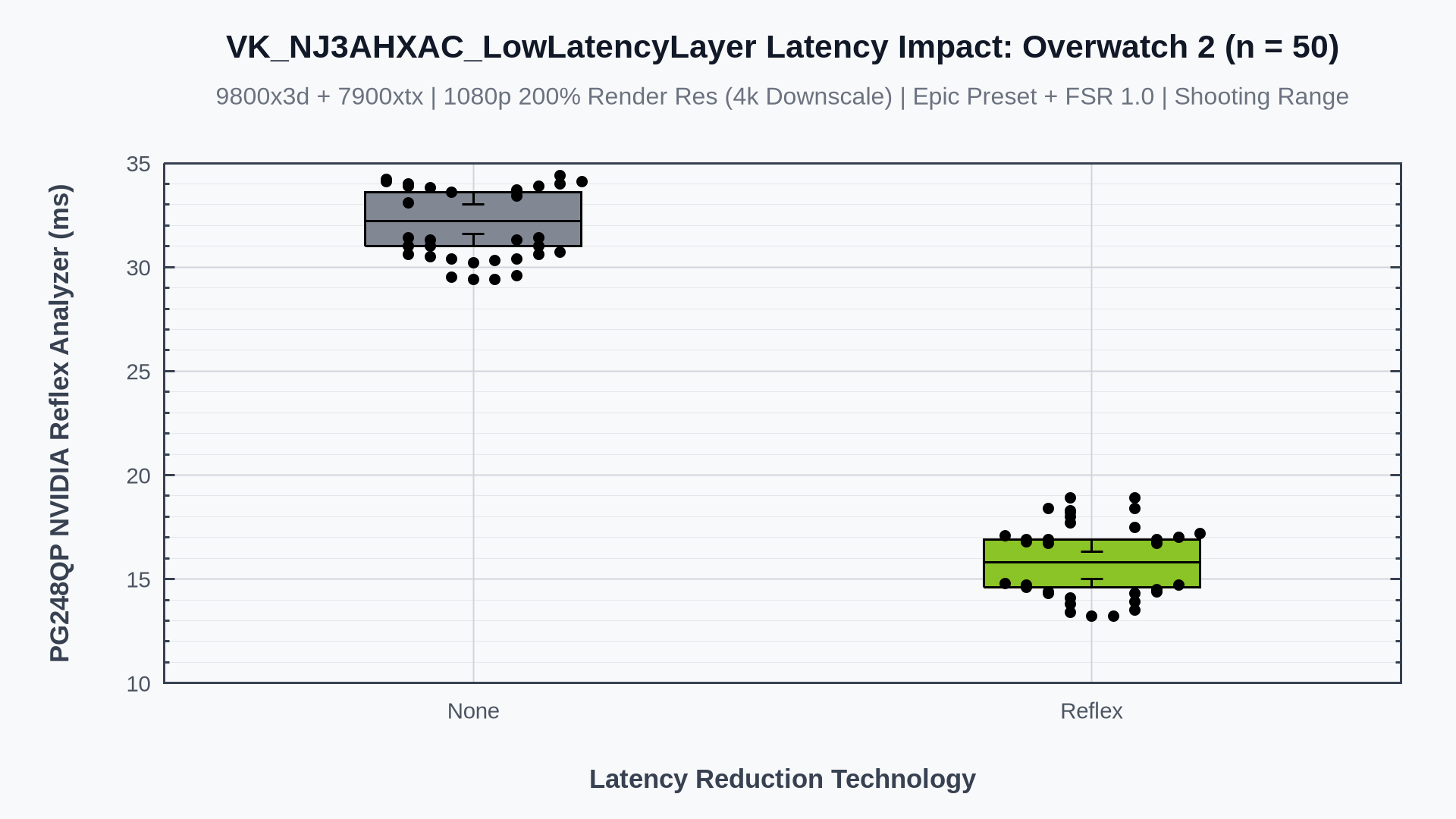
- This DX11 (DXVK) Proton game only supports Reflex - `PROTON_FORCE_NVAPI=1`, `LOW_LATENCY_LAYER_EXPOSE_REFLEX=1` and `LOW_LATENCY_LAYER_SPOOF_NVIDIA=1` were used to force Reflex support through the layer and Proton, regardless of the underlying hardware.
- This was one of the only applications tested that allowed us to scale render resolution to 4k (we're avoiding gamescope for latency reasons). This resulted in a greater GPU backlog than would usually be present at 1080p. This test is probably more indicative of the latency improvements most setups would find as we're not pushing hundreds of FPS - we recorded around 160fps in this scenario.
- Reflex provides a 16.4ms median latency improvement, which is around a 50% reduction in total system latency.
## The Finals
**Results**
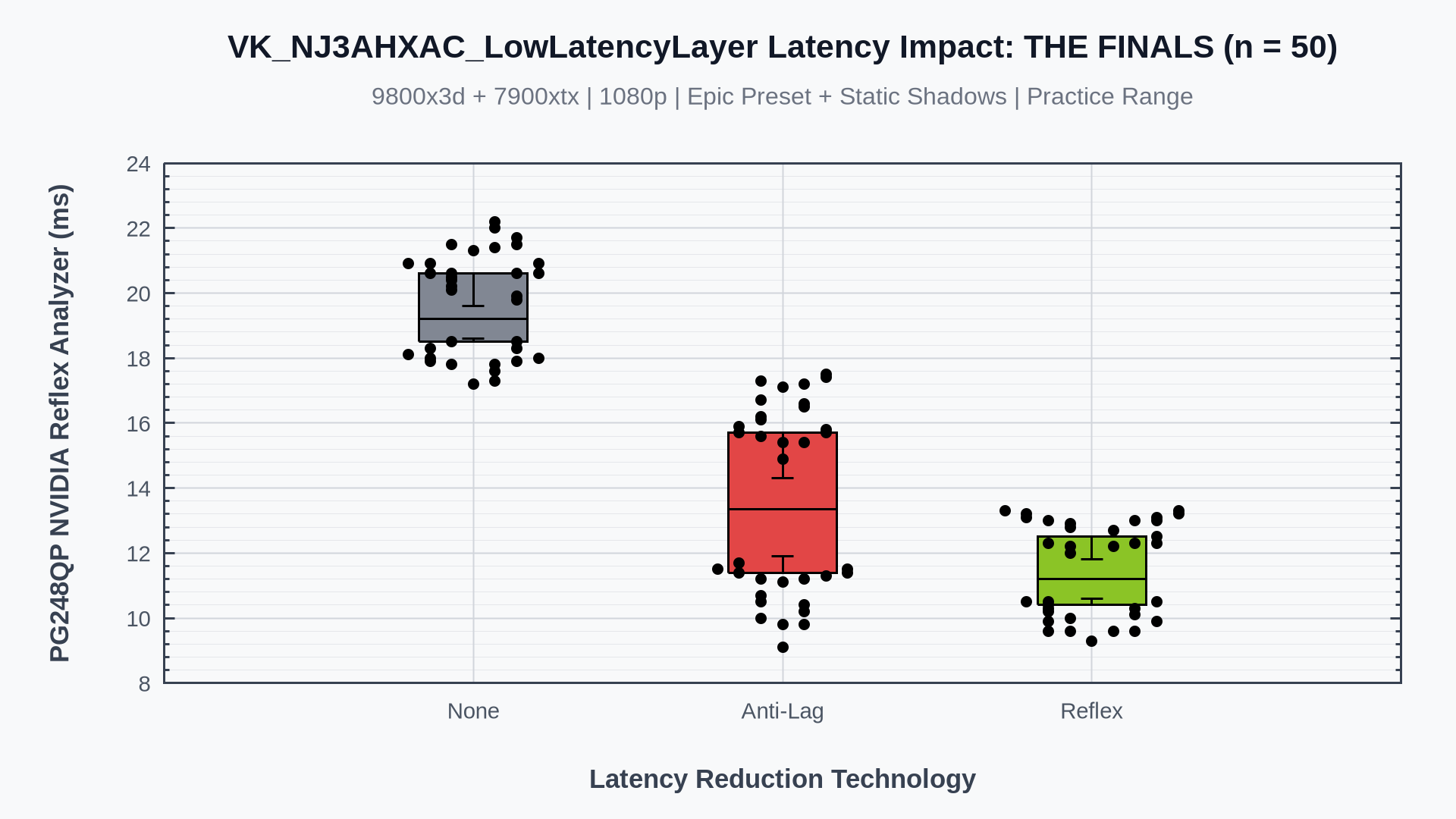
- This DX12 (VKD3D) Proton game supports both Anti-Lag and Reflex. We can see a direct comparison of the two technologies here. We didn't expect such a large delta and the reason for this is under investigation.
- Identical launch options to Overwatch 2 were required for Reflex.
- We saw a reduction of around 6ms for Anti-Lag and 8ms for Reflex - approximately a 33% and 40% latency reduction respectively from the baseline.
- Average FPS was around 260 during testing.
## Counter-Strike 2
**Results**
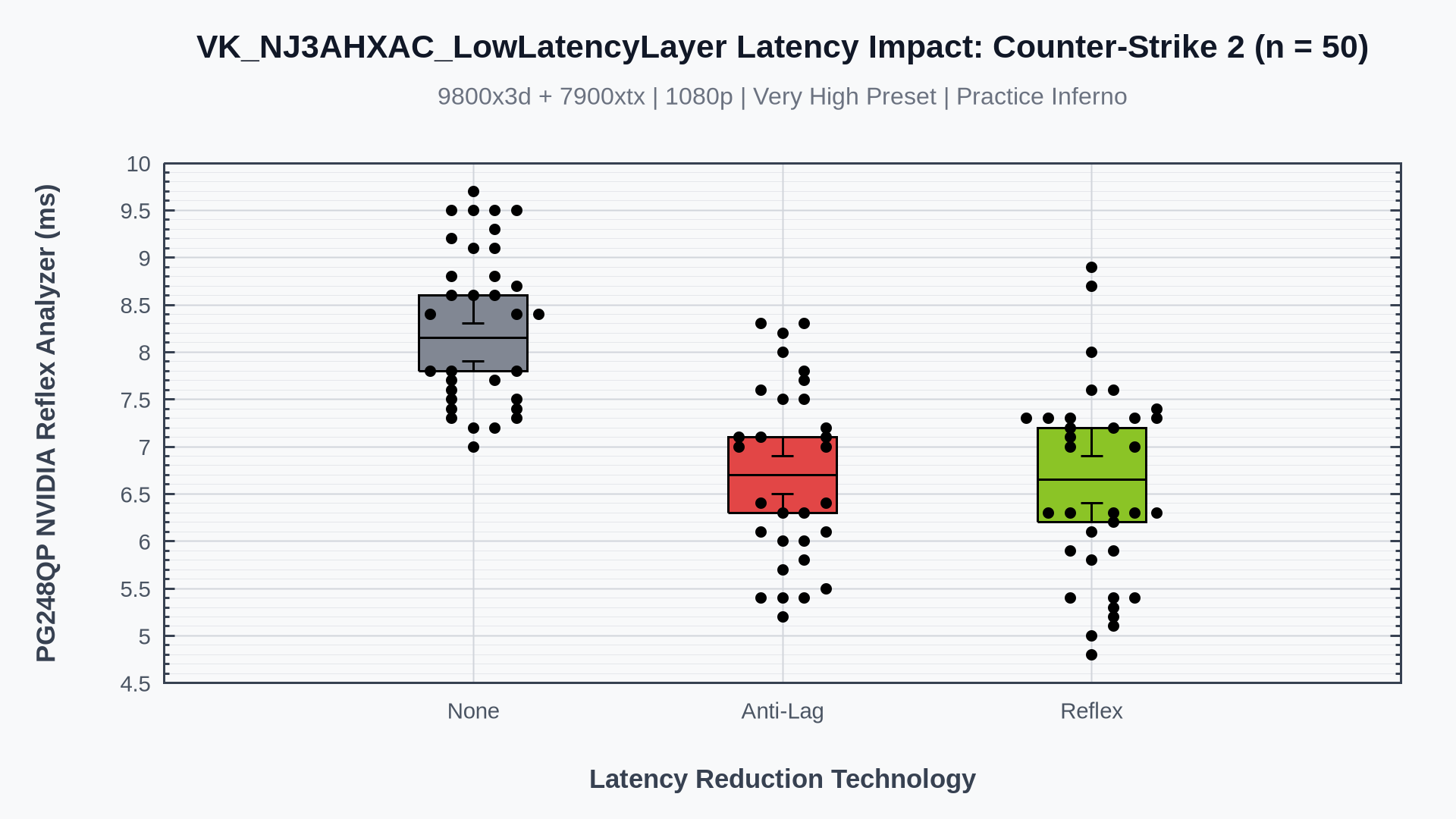
- Counter-Strike is a Vulkan Linux native game. It's the fastest of the three applications tested, yet we still see a strong improvement here. We sat at around 520fps for the duration of these tests.
- Reflex appears to pull ahead slightly, but this is not statistically significant.
- Both latency reduction technologies reduced total system latency by about 20%, or 1.5ms. The actual benefit is likely far greater and can be felt during actual gameplay.
# Contact
Email me to report issues or for help: nj3ahxac@gmail.com
|
